Please find below the complete code and modify it as per your need.
Once the .ics file is generated, you can open it in Outlook and Save it.
<?php
Please find below the complete code and modify it as per your need.
Once the .ics file is generated, you can open it in Outlook and Save it.
<?php
If you want to replace a string in a given string.
SELECT name, REPLACE(name, 'Demo', 'Test') AS `replaced_string` FROM `table_names`;
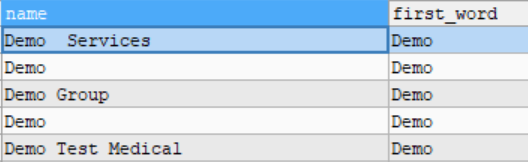
If you want to get the first word in a given string.
If you want to get the count of words in a string.
SELECT name, (LENGTH(name) - LENGTH(REPLACE(name, ' ', '')) + 1) AS word_count FROM `table_names`;
KAFKA is an open source developed by LinkedIn for data pipelining, data streaming, data processing, and data transferring with maximum throughput. It's managed by Apache.
We use Kafka on the AWS environment under Python and PHP technologies to manage a high volume of data to load in a fraction of a second.
Kafka helps in real-time data streaming, connecting to any sources like AWS S3, can be auto-scale and optimize data streams. Many big giants using Kafka.
We sometimes face this error when new install Laravel and run composer udpate
Type error: Argument 1 passed to Illuminate\\Routing\\Middleware\\ThrottleRequests::addHeaders()
must be an instance of Symfony\\Component\\HttpFoundation\\Response, null given
Solution:
For me, the issue is resolved by correcting database credentials in the .env file. Hope the same will work for
you as well.
I am sharing my PHP code to get difference between two dates.
$workingDays = 0;
$startTimestamp = strtotime('2021-06-03');$endTimestamp = strtotime('2022-07-09');for ($i = $startTimestamp; $i <= $endTimestamp; $i = $i + (60 * 60 * 24)) {if (date("N", $i) <= 5) $workingDays = $workingDays + 1;}echo "no. of days: " . $workingDays;
Save code in nofdays.php.
Run program in terminal. Output will be:
$ php nofdays.phpFirst we load any PDF. Then user click Add signature button. User can upload signature file as well. Once user draw or upload his signature, it will show in drag area on right side. User can drag that signature anywhere on the PDF file. Once user click Acceptance checkbox, as most of the sites ask for acceptance of policy or any agreement. Submit button becomes available. User can save signature file, email that or upload on server, developer has to write that script as per his requirements.
I am sharing my script to generate PDF file from HTML file in Python using PDFKit module.
Install Python PDF-Kit
$ pip install pdfkit
import pdfkit
pdfkit.from_url('http://testpage.com', 'out.pdf')
pdfkit.from_file('test.html', 'out.pdf')
pdfkit.from_string('Hello!', 'out.pdf')
import os
import sysfrom flask import Flask,requestimport pdfkitfrom flask import make_responseimport logging.configapp = Flask(__name__)from decouple import config# Logger and handlersLOGGING = {'version': 1,'disable_existing_loggers': False,'formatters': {'console': {'format': '%(levelname)-1s: %(asctime)s [%(name)-12s.%(funcName)s.%(lineno)s] %(message)s',},'file': {'format': '%(levelname)-1s: %(asctime)s [%(name)-12s.%(funcName)s.%(lineno)s] %(message)s',},},'handlers': {'console': {'level': "DEBUG",'class': 'logging.StreamHandler','formatter': 'console','stream': sys.stdout},'file': {'level': "DEBUG",'class': 'logging.handlers.RotatingFileHandler','formatter': 'file','filename': 'htmltopdf.log',},},'loggers': {'': {'handlers': ['file'],'level': "DEBUG",'propagate': True},}}logging.config.dictConfig(LOGGING)LOGGER = logging.getLogger(__name__)@app.route("/")# Function for html to pdf convertordef function_html_to_pdf_convertor():try:logging.debug("calling func")html_file = request.args.get('f', default="", type=str)if html_file:html_file = '{}{}'.format(html_file,'.html')filepath = os.path.join(app.static_folder, html_file)filename = os.path.splitext(os.path.basename(filepath))[0]css = "static/style.css"options = {'page-size': 'Letter','encoding': "UTF-8",'zoom': 1.80,'footer-center': 'Page [page]/[topage]','footer-font-size': 8}if os.path.isfile(filepath):#pdf = pdfkit.from_file(filepath, css=css)pdf = pdfkit.from_file(filepath, False,options=options, css=css)response = make_response(pdf)response.headers.set('Content-Disposition', 'attachment', filename=filename + '.pdf')response.headers.set('Content-Type', 'application/pdf')return responseelse:logging.debug("File not found")return {"status": 404,"message": 'File not found'}logging.debug("'Please provide file'")return{"status": 400,"message": 'Please provide file'}except Exception as e:logging.debug("Bad request {}".format(e))return {"status": 400,"error": '{}'.format(e)}# main functionif __name__ == "__main__":app.run()
AWS SSO Cognito OAuth2.0 implementation as per below URL:
https://aws.amazon.com/blogs/mobile/understanding-amazon-cognito-user-pool-oauth-2-0-grants/
First we need to create code, get Client ID and Client Secret. Run below URL:
https://AUTH_DOMAIN/login?client_id=XXXXXXXXXX&response_type=code&scope=email+openid&redirect_uri=http://localhost/test/sso_check
Above URL will return to redirect url with code in query string.
Note: Code is valid for one time transaction only.
Get Access Token using the Code as per below description:
Make below request:
this will return below response:
From above response we need to use id_token to get user information:
I am sharing my Python code to create simple REST API. I have used Python's lightweight framework Flask is used to create simple REST API. Flask Restful is an extension of Flask. This code may helpful for some beginner Python developer.
As CSV is most common file to import and export data on web applications. So we may need to use this feature in almost our most of the apps. So I am sharing my small Python code to print CSV data into an array. May this code is helpful for someone.
We need CSV module of Python for this code to run. We used CSV module `reader` function to read CSV content in Python.
Python is an easy to learn, powerful programming language. It has efficient high-level data structures and a simple but effective approach to object-oriented programming.
Python is an interpreted language, which can save you considerable time during program development because no compilation and linking is necessary.
Python is extensible: with C/C++/Java code, and easily embeddable in applications.
Some Python modules are also useful as scripts.
Python source files are treated as encoded in UTF-8.
Start the interpreter and wait for the primary prompt, >>>.
The interpreter acts as a simple calculator. The operators +, -, * and / work just like in most other languages.
Python can also manipulate strings. They can be enclosed in single quotes (‘) or double quotes (“).
Simple print command in Python.
Math Commands acts like a calculator.
pip install colourRef: https://pypi.org/project/colour/Converts and manipulates common color representation (RGB, HSL, web, …)Recently worked on creating a .ics file in PHP after a very long time, code so thought to share with everybody. Please find below the comple...